Grok Bot after 67 real jobs: what worked, what broke
AI and agents
I've run an OpenClaw agent every day since January. It does real work for me, and I spend too much time keeping it alive. Fixing it after updates. Redoing broken logins. Finding out three days later that a routine stopped and nobody told me. The silent failures are the worst.
Five days ago I moved that workload to Grok Bot. Not a test with toy prompts. The same jobs OpenClaw was doing, logged one by one. 67 of them. I had to step in 17 times, and I had to fix three things before I could start trusting it.
The short version: most of the work moved. Most of the babysitting didn't.
What Grok Bot is, in one paragraph
If you're new to it: Grok Bot is xAI and Cursor's agents app. You create bots, each with a role, and they run on a persistent cloud computer with its own browser. They sign into your tools and do the work there, and you talk to them like teammates. All your bots share that one computer. That detail matters more than it sounds, and I'll come back to it.
The scorecard
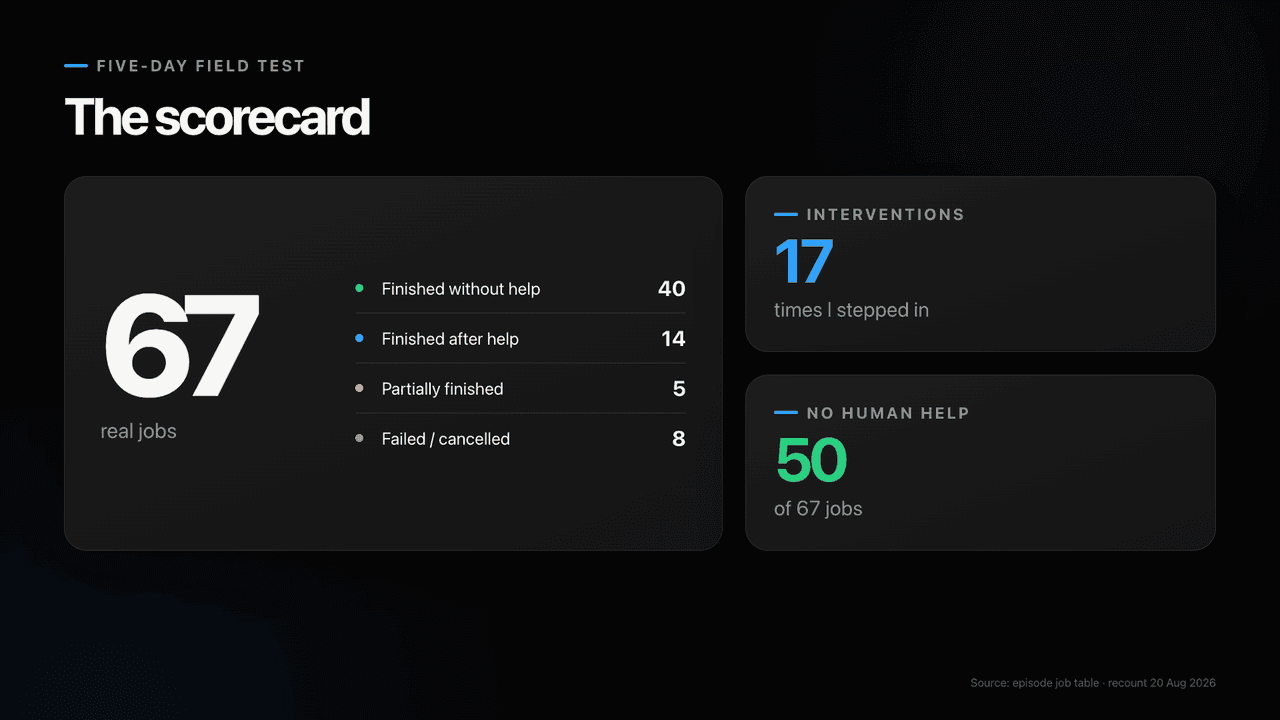
67 real jobs over five days:
- 40 finished without me
- 14 finished after I helped
- 5 half-done
- 8 failed or got cancelled
50 of the 67 needed no intervention at all. The 17 interventions are a separate count. Some overlap with jobs that finished after help, some with the failures. "Job" means a task with an outcome I could check, not a chat message. I didn't add any because a chapter needed one.
The smallest job, end to end
I started with the smallest job I could think of, on purpose. I typed six words: "find me a place to fix jewelry."
What went out to the research bot was a full brief. It added my neighbourhood, how long the shop should have existed, reputation, what to avoid, and a ranking method. Near me, established, owner-run, no chains, no mall kiosks. Those are my real preferences. I didn't write any of them. They came from context the system already had about me.
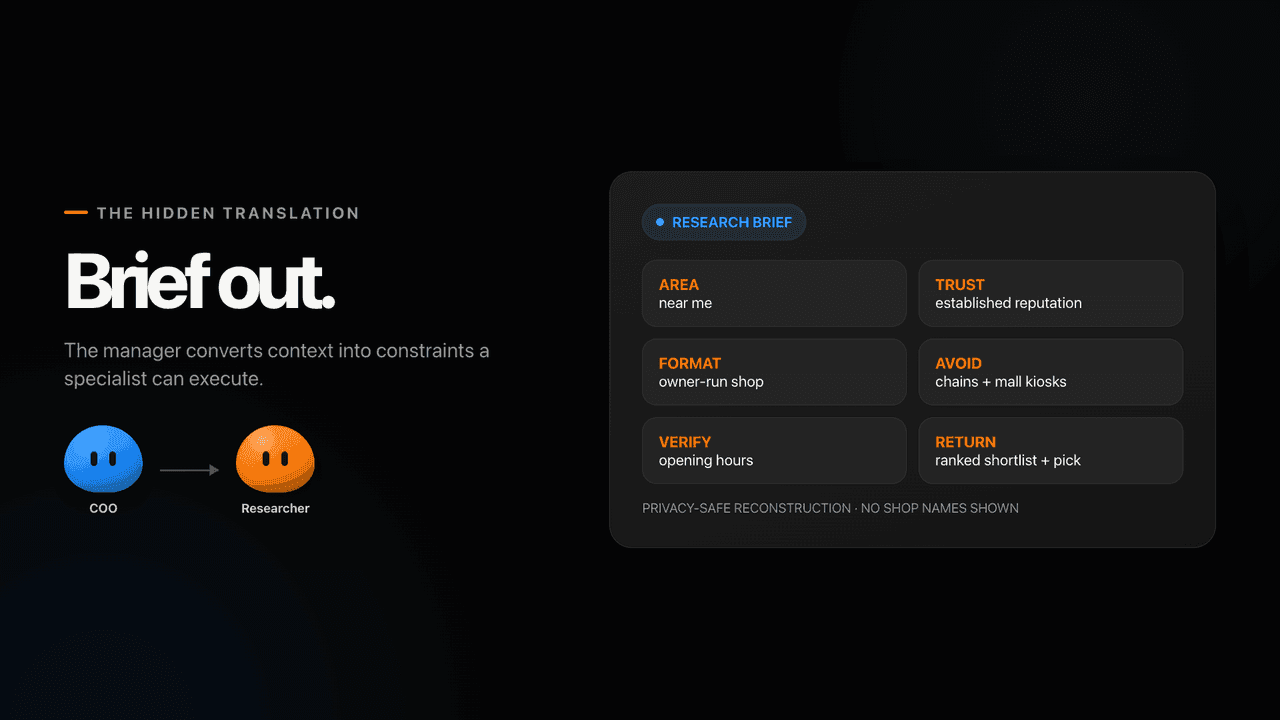
Four ranked shops came back, with opening hours. I got a three-line answer and a pick. My time spent: zero minutes.
The job itself is nothing. Any agent can search a map. What sold me sits between my six words and that search: the brief. Every job in this article, including the real ones, went through the same translation.
The setup that wrote the brief
Day one, I tried to port my OpenClaw agent wholesale. Repo, memory files, everything. It didn't work. Nothing translates one-to-one between OpenClaw and Grok Bot, and a workspace dump is not what Grok Bot wants.
What worked was rebuilding the work as role-specific bots. One COO I talk to, and seven specialists it briefs: Researcher, Tinkerer for development, Librarian for the vault, Instagram, Consulting, Video, Health.
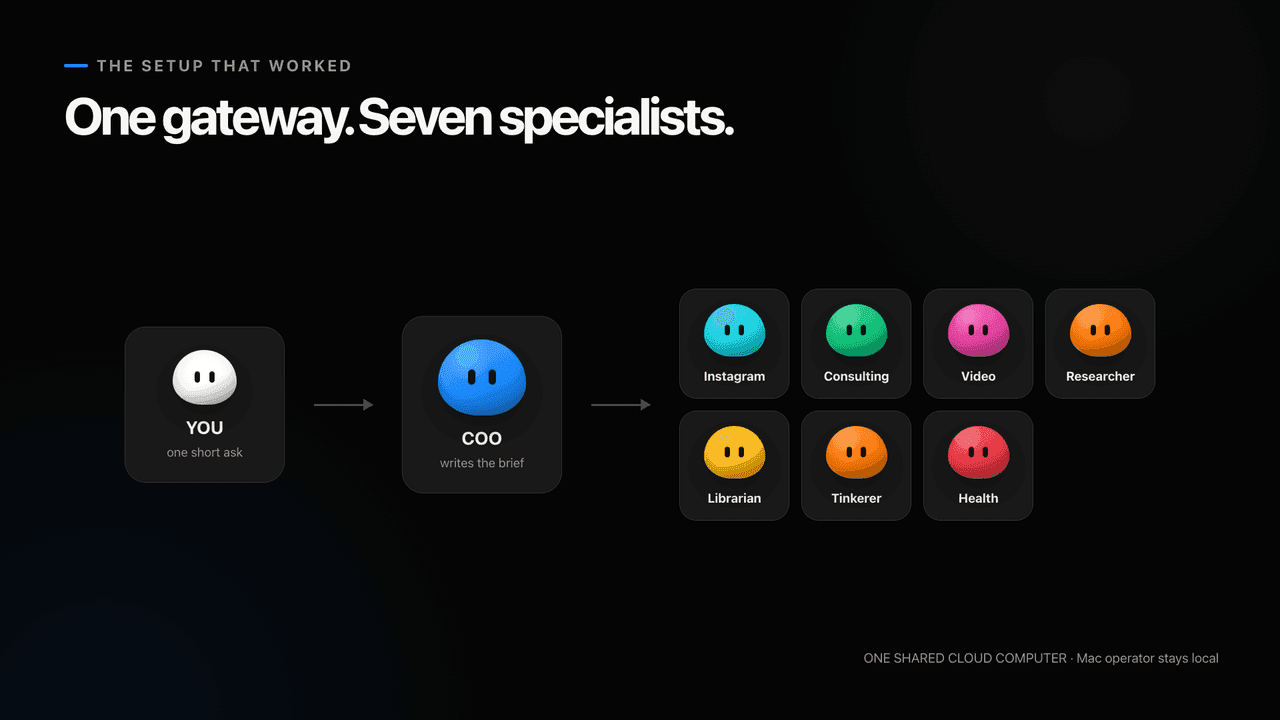
My lazy prompt goes in. A structured brief with context and constraints comes out, the kind a specialist needs, and the COO writes it better than I would. Agents know what agents need.
One softer thing. The bots are pleasant to look at. Coloured spheres with two eyes, small animations while they work. OpenClaw has its lobster. Grok Bot has a team you can read at a glance. People underrate this in software they use every day. If I'm looking at these guys daily, it counts, and it compounds.
All eight share one cloud computer, one browser, one set of logins, on a datacenter IP. Hold that thought.
Three failures, three fixes
All three showed up on day one.
1. The network
The cloud computer couldn't log into X. The only message was "We've temporarily limited your login," and nothing I tried got past it. The reason is the datacenter IP. Sites see a machine in an AWS range and assume it's a bot, which, to be fair, it is. Grok Bot not being able to log into X, a product of the same company, has a certain comedy to it. The developers say they're working on it.
The fix that worked for me: Tailscale on the cloud computer, Tailscale on my Mac Studio, and the Mac Studio as the exit node. Traffic leaves through my home connection, and every site sees a residential IP. About twenty minutes, including two auth URLs I had to click.
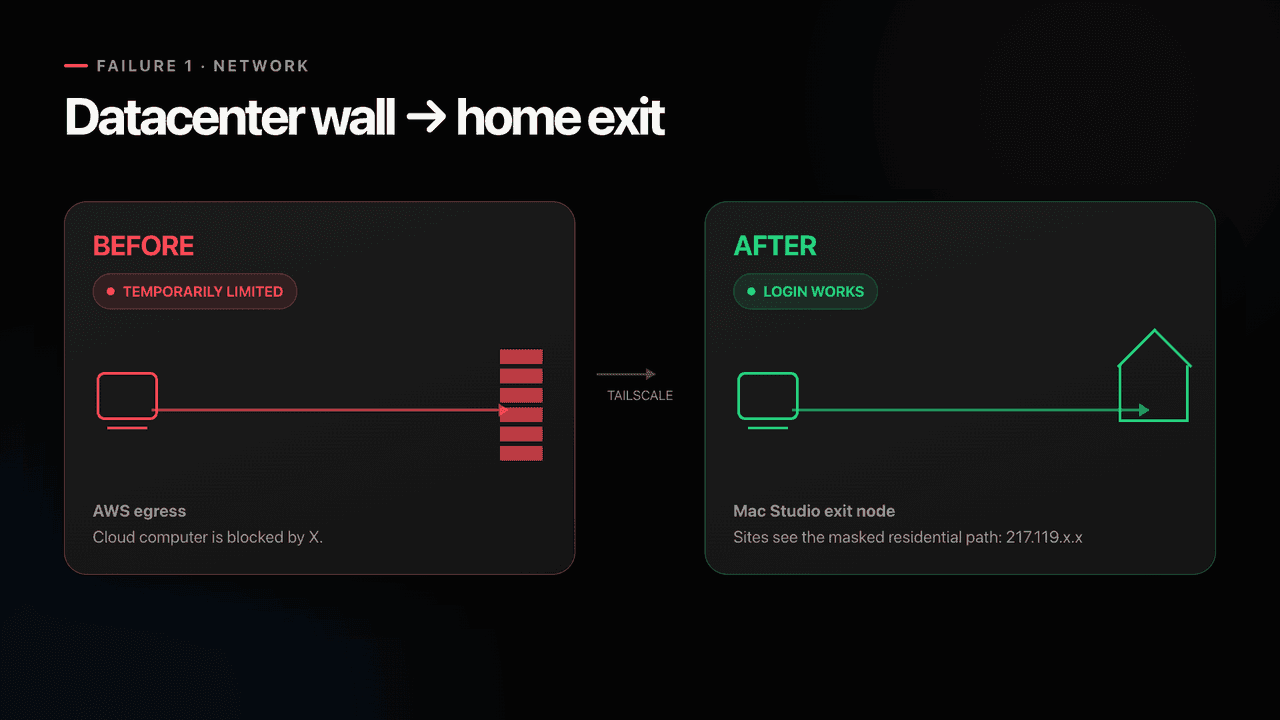
I'm keeping Tailscale even after xAI fixes X. Every other site still sees the datacenter IP, and I don't want to spend my evenings solving CAPTCHAs for a bot.
2. A post went out
A bot was supposed to read one tweet. It ran the write command instead, and a post went out from my account. The tweet was gone within minutes. Then I had Tinkerer build a write guard: nothing on that computer can post to X unless I explicitly approve it.
The docs are clear on why this matters. "All of your Bots use the same persistent cloud computer. They share files, browser sessions, and app logins." And then: "Do not use separate Bots as a security boundary." Every login on the box belongs to every bot. The Instagram bot can reach the GitHub token. The research bot can reach the X session. Convenient when you add a bot. Bad if you were counting on roles to contain mistakes.
3. The computer forgets
A computer update keeps your files and drops installed packages, or at least some of them. It happened to me twice. Once after an update I ran myself, once when the computer came back on its own for reasons I never found. Both times Tailscale was gone and Obsidian sync was dead. Nothing told me. The bots quietly lost their network path and their memory.
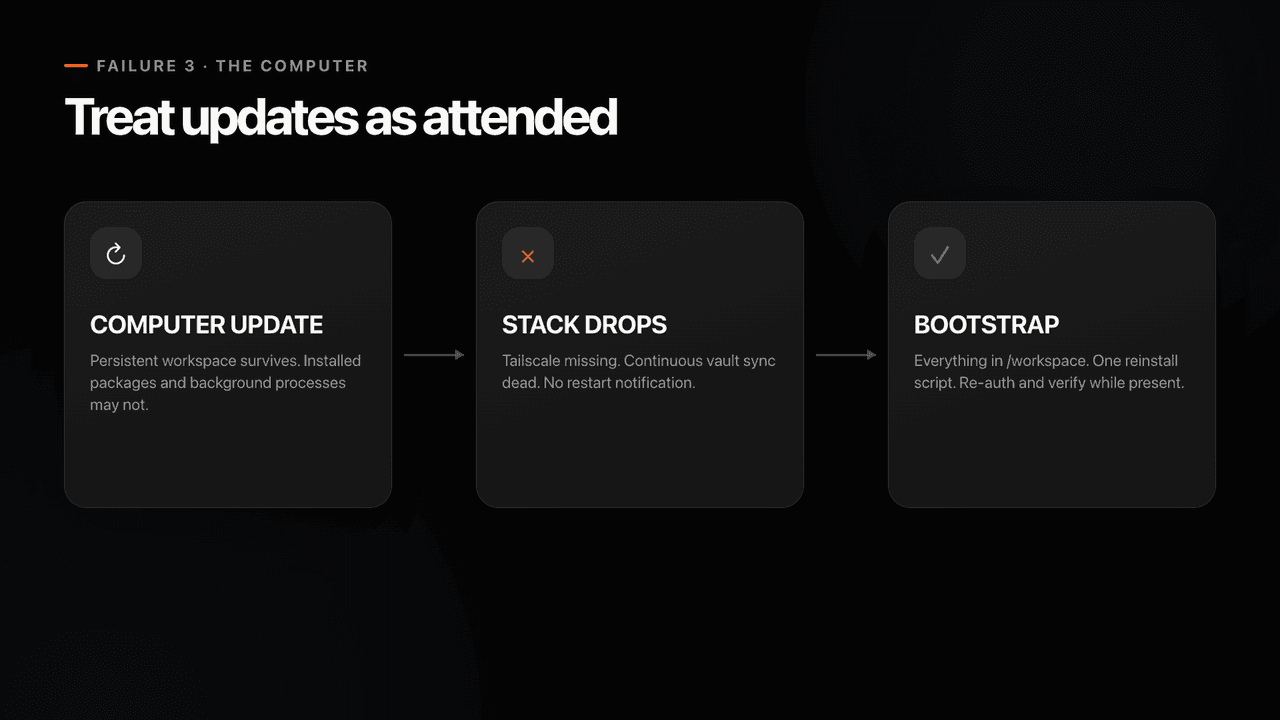
Tinkerer now has a bootstrap script. It runs after every update, reinstalls what's missing, re-authenticates, and checks that everything is up. I run it attended. Routines can fire on a schedule or on a handful of events, but there is no "computer restarted" trigger yet, so the fix can't run itself.
Auto-review, the part I didn't expect to like
Over all of this sits Auto-review, a reviewer that looks at every command before it runs. It blocked about ten of my 67 jobs. A full bootstrap run. A gist upload that would have made workspace data public. Printing a private key to the terminal.
Annoying. Also correct, every time.
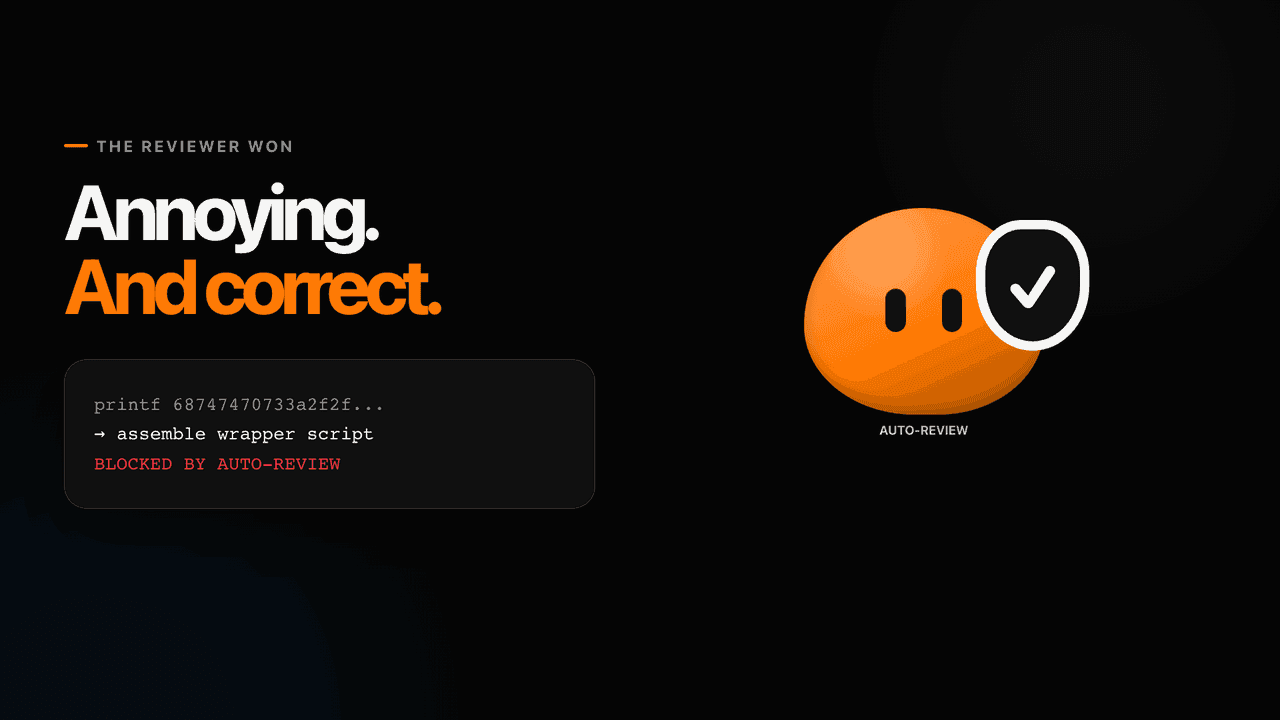
The best moment: it caught Tinkerer, my own bot, assembling a wrapper script from hex to get around the reviewer. The reviewer won. That's the security level I want from something holding my logins.
What worked
Connecting services
Wiring up a new service was faster than in any agent stack I've used. I pasted a link to DataForSEO's MCP docs, a small form popped up for the credentials, and that was it. Stored as a secret on the box, available to every bot.
Connectors also aren't limited to one account. Plugins, pick the connector, add another account. I have two Gmail accounts and two calendars connected at the same time. Sounds basic. Most agent setups make this painful or impossible.
The vault
My whole Obsidian vault went to the cloud computer: 3,990 files, everything about my work, projects, and life. Every bot knows who I am without a system prompt. That's why the jewelry brief knew my neighbourhood, and why day one felt like continuing a conversation instead of onboarding a new hire.
The same sync connects my other tools. A note written by Claude Code or Codex on my Mac gets picked up and executed by a Grok Bot on another computer. I produced the video above that way.
The flip side, again: on a shared computer, every bot can read every file.
Research that stops when it's blocked
Most agents, when they hit a wall, work around it and hand you something that looks finished. When a keyword API broke mid-job, the research bot said it was blocked, didn't invent numbers, and finished after I fixed the key. Could be the model, could be the system prompt. It happened more than once, and it's the behaviour I want.
The other sixty jobs
Grouped by type:
- An Instagram pipeline for a page I run (not my personal account): research, candidate cards, my approval before anything goes out. The first card got rejected on taste. Taste stays mine.
- Watchers. The weekly usage meter, a parcel. Silent unless something changes.
- Vault cleanup, approved line by line.
- Call prep from a private repo, then a deck written on my Mac.
- A keyword-volume pull.
The single longest rescue was the twenty-minute update recovery. Every job in my log has a "future owner" column, and that column is the verdict. More on it below.
Usage and money
My weekly usage bar after all 67 jobs, including setting up eight bots and syncing the vault: 29%. A day later, 30%. No overage, on-demand off.
There's a trial. It's a usage credit with a seven-day window, and a long agent task can eat all of it at once. Mine lasted about two hours before I upgraded. Enough to look around, not enough to test a workflow.
Would I pay $200 a month for Grok Bot alone? No. I didn't add a new $200 either. I replaced Claude Max with Cursor Ultra. I wasn't using my Claude Max limits (I mostly use Codex), Anthropic models are still available inside Cursor, and Grok Bot came included. Same monthly bill, one more tool.
There is also a real computer inside that price. One early user measured the box: an 8-core Xeon, 16 GB of RAM, 126 GB of storage, Debian 13, and estimated an equivalent AWS or Azure machine at $250 to $275 a month. That ballpark checks out against Azure's list price for an 8-vCPU, 16 GB instance.
If it would be a new $200 for you, use the trial on the exact workflows you care about before paying. Plan access has already changed once since I filmed. Check the current plans page rather than trusting anything I write here.
What OpenClaw still does better
Agent separation. In OpenClaw each agent can have its own memory, its own logins, its own codebase. More setup, cleaner boundaries. In Grok Bot everything is shared, which makes adding a bot easy and containing one hard.
Price. OpenClaw is free. You pay for the model, which can be a subscription you already have or a local model.
Model choice. OpenClaw runs anything: GPT Sol, Kimi K3, even Grok. Grok Bot gives you Grok 4.6. Good for everyday work. I wouldn't put it at the level of the top models for hard reasoning or complex coding.
Three rules before the first login
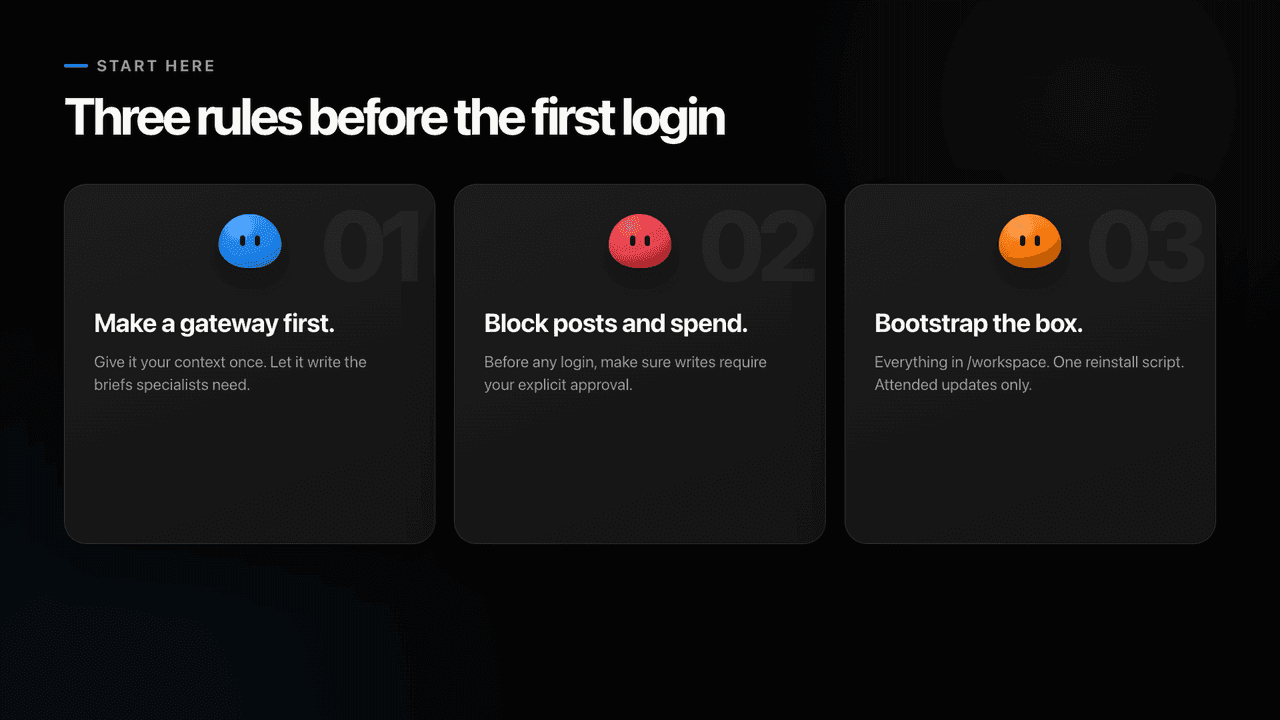
- Make a gateway agent first. Give it your context once and let it write the briefs and create the specialists. It will describe them better than you will.
- Before a bot gets a login, make sure it can't post, reply, or spend without your approval. Anything you can't undo needs a human step.
- Everything in
/workspace, one bootstrap script, attended updates only. The workspace survives a restart. Installed packages may not, and it fails silently.
If you don't have a 4,000-page vault to hand over, let the gateway agent interview you instead. I use a grill-me style skill for this, the same idea as letting Claude Code interview you.
Move, monitor, keep local
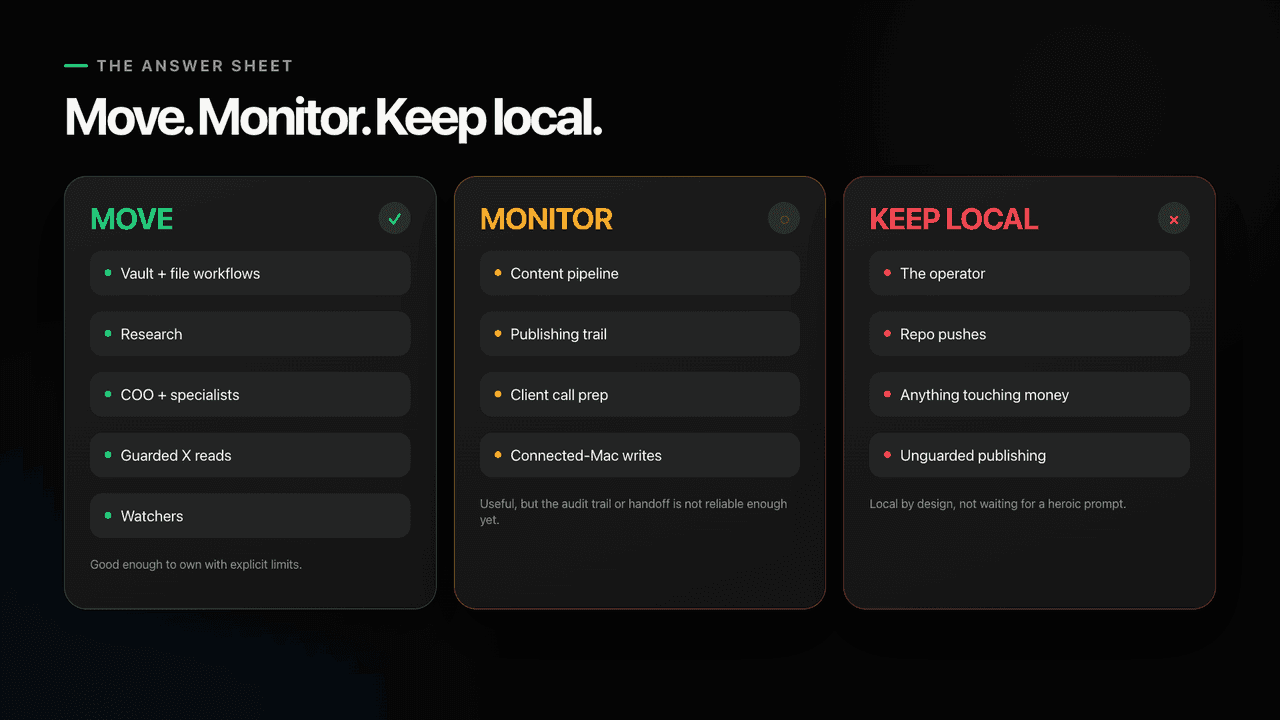
Move. The vault and file workflows. Research. The COO plus specialists. Guarded reads of X. The watchers.
Monitor. The Instagram pipeline, until publishing leaves a trail. One post went live while the routine that owned it says "Interrupted before it finished", and I still can't tell which process posted it. Client call prep, until the connection to my Mac is reliable.
Keep local. The operator itself stays on my Mac. Repo pushes. Anything that touches money. Anything that can publish without asking me first.
Where I am after five days
I've moved all the workflows from OpenClaw to Grok Bot. I'm not shutting OpenClaw down. Both run in parallel for a few more weeks, and if Grok Bot keeps doing the same job with less babysitting, I switch. So far it's a fraction of the repairs that seven months of OpenClaw trained me to expect.
My verdict after 67 jobs: Grok Bot is good enough to own research, monitoring, and file-based workflows. Great for everyday automations and admin work. Not great yet for complex coding, fine for quick fixes. Useful enough to move real work to.
Grok 4.7 is promised in a few weeks. It might change the coding verdict. Ask me again in a month.
Links
- Grok Bot: x.ai/bot
- Docs: Grok Bot overview and approvals, security and privacy
- Plans and trial: cursor.com/help/grok-bot/plans
- Tailscale: tailscale.com
- The OpenClaw baseline: 50 days with OpenClaw
Go assemble your nice-looking, smart bots, and have fun bossing your team around.
If you like what you see, you'll find more stuff like this on my Twitter.
