TIL: How to stop Claude Code from adding itself as co-author and contributor in GitHub
Updated 2026-11-08 for the current Claude Code settings.
Claude Code has this interesting default behavior where it adds itself as a co-author to every commit it helps you make. You'll see something like this at the end of your commit messages:
The name is whichever model made the commit, so yours might say Claude Sonnet 5 or another model.
And it's also listed as a contributor in the GitHub repository.
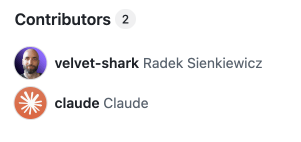
While it's nice that Claude wants to share credit for the work, sometimes you just want to be the sole author of your commits. Maybe you're working on a personal project, maybe you have contribution requirements at work, or maybe you just don't want an AI showing up in your GitHub contribution graph.
The fix is simple. Add this to your Claude Code settings:
This turns off all attribution: the "Co-Authored-By" line in commit messages and the "🤖 Generated with Claude Code" line in pull request descriptions.
The settings file location depends on your operating system:
- macOS/Linux:
~/.claude/settings.json - Windows:
%USERPROFILE%\.claude\settings.json
If the file doesn't exist yet, just create it with the content above. If it already has other settings, add the "attribution": false line inside the existing curly braces instead of pasting a second block.
Using an older version of Claude Code?
"attribution": false needs Claude Code v2.1.281 or later (check with claude --version). Older versions reject it and ignore your whole settings file. If you're stuck on an older version, or another machine with an older version reads the same file, use this instead:
What do these settings do?
commit: removes the "Co-Authored-By" line from commit messagespr: removes the "🤖 Generated with Claude Code" line from pull request descriptionssessionUrl: removes the claude.ai session link that Claude Code adds to commits and pull requests made from cloud or Remote Control sessions
The setting only applies to new commits. Commits Claude already co-authored keep their trailer.
After making this change, your commits will be 100% yours again. No more explaining to your team why an AI assistant is showing up as a contributor to your repository.
Of course, Claude still did help you write the code. But now that's just between you and Claude. Your little secret.
If you like what you see, you'll find more stuff like this on my Twitter.
