Stop overpaying for OpenClaw: Multi-model routing guide
AI and agents
If you're running OpenClaw, there's a good chance you're burning money right now without realizing it.
By default, everything goes to your primary model. Heartbeat checks? Opus. Quick calendar lookup? Opus. Sub-agents doing parallel work? All Opus.
Opus is a great model, but using it for a heartbeat is like hiring a lawyer to check your mailbox. It works, but it makes no financial sense.
This guide shows you how to cut costs by 50-80% with one config change - without losing quality on the tasks that matter.
Why this happens
OpenClaw sends everything to one model by default. That's the problem.
Heartbeats are periodic "are you still there?" checks sent every 30 minutes. They use your primary model.
Sub-agents spawn when your main agent does parallel work. Each one uses the primary model.
Simple queries - "what's on my calendar?" - get routed to the same model you use for complex coding.
And there's no fallback. When Anthropic's API hits a rate limit, your agent stops. No automatic switch to OpenAI or anything else.
So you're paying premium prices for simple tasks, and you have no backup when things break.
The solution: model tiering
The fix is model tiering. Different models for different tasks based on what each one needs.
Complex reasoning - architecture decisions, multi-file refactoring, novel problem-solving - needs a frontier model. Opus or GPT-5.2. They're expensive, but worth it for hard tasks.
Daily work - code generation, research, content creation - works fine on a mid-tier model like Sonnet or DeepSeek R1. R1 costs 90% less than Opus for similar reasoning quality.
Simple tasks - heartbeats, quick lookups, classification - should use the cheapest model that works. Gemini Flash-Lite is 50 cents per million tokens. DeepSeek V3.2 is 53 cents. That's 60 times cheaper than Opus.
Model pricing comparison
Here's a comparison of models and their costs per million tokens (input + output combined):
| Model | Cost | Best for |
|---|---|---|
| Xiaomi MiMo-V2-Flash | $0.40 | Cheapest option, heartbeats |
| Gemini 2.5 Flash-Lite | $0.50 | Heartbeats, simple tasks |
| DeepSeek V3.2 | $0.53 | Simple tasks, classification |
| GLM 4.7 | $0.96 | Coding, 200K context |
| Kimi K2 Thinking | $2.15 | Reasoning (budget option) |
| DeepSeek R1 | $2.74 | Reasoning, sub-agents |
| Gemini 3 Flash | $3.50 | Fast responses, mid-tier |
| GPT-5 | $11.25 | Frontier, best value |
| Gemini 3 Pro | $14.00 | Frontier, 1M context |
| GPT-5.2 | $15.75 | Latest OpenAI flagship |
| Claude Sonnet 4.5 | $18.00 | Premium tier |
| Claude Opus 4.5 | $30.00 | Complex synthesis only |
Opus is at the very top at $30 per million tokens. Gemini 2.5 Flash-Lite is 50 cents. For a heartbeat, there's no quality difference. The cheap model works just as well.
Cheap models are also faster. Gemini 3 Flash runs at about 250 tokens per second. Opus runs at around 50. You get answers faster and pay 60 times less.
Two ways to implement this
Manual configuration: you set which model handles which task. More control, more setup.
OpenRouter's auto router: Set openrouter/openrouter/auto as your model and it routes based on prompt complexity. Simple prompts go to cheap models, complex ones go to capable models. Less control, but no configuration.
I'll cover the manual approach where you can see what's happening and make your own decisions.
The config
Most configs look like this:
One model. Everything goes there. Heartbeats, sub-agents, simple lookups - all Opus, all expensive.
Here's the optimized version:
Two sections matter most.
Heartbeat configuration. Instead of Opus at $30, heartbeats use Gemini 2.5 Flash-Lite at 50 cents per million. Every 30 minutes, your agent checks in for almost nothing.
Sub-agents. When your main agent spawns workers, they use DeepSeek R1 at $2.74 per million. That's 10x cheaper than Opus, with solid reasoning.
Your main tasks still hit Opus. The cheap models only handle the stuff that doesn't need intelligence - heartbeats and background checks.
The fallback chain matters too. Notice the first fallback is GPT-5.2, not Sonnet. If Anthropic is rate-limited, all their models might be slow. Falling back to a different provider keeps you running.
Config file goes in your home directory: ~/.openclaw/openclaw.json. If you installed the older Clawdbot package via npm, check ~/.clawdbot/clawdbot.json instead. Edit, save, restart - done.
Quick tip: the /model command
You can switch models on the fly without editing your config:
This is good for quick cost control. Working on something complex? Stay on Opus. Quick question about finding a file or checking the weather? /model ds, ask, then /model opus to switch back.
The aliases in the config - opus, sonnet, flash, ds - are what you type after /model. Much easier than typing the full model path.
Cost calculator
Those were my numbers. What about yours?
I built a calculator so you can see what you'd save with your usage. It's at calculator.vlvt.sh.
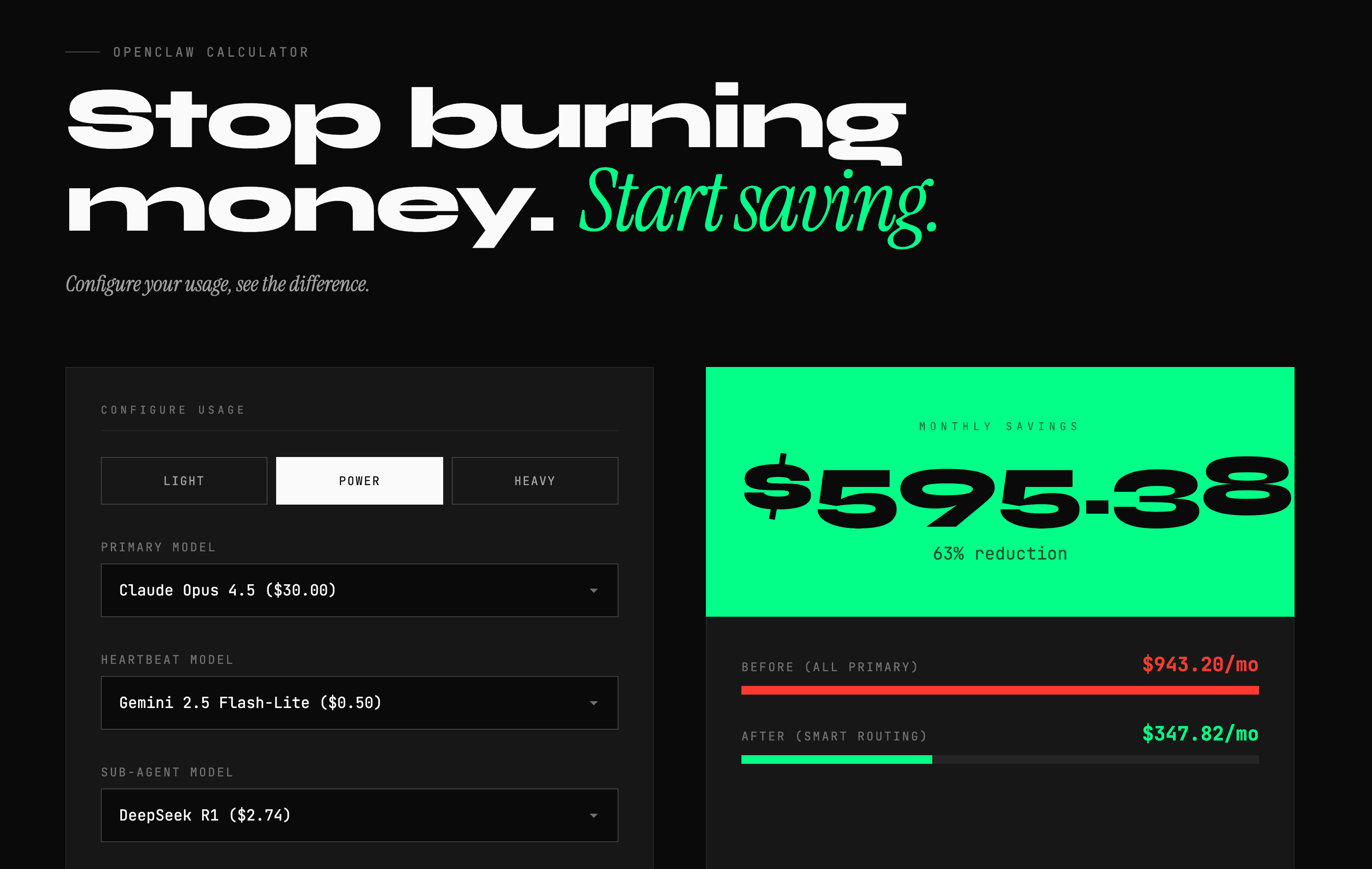
Here are a few scenarios:
Light user - just getting started. 24 heartbeats per day (once per hour), 20 sub-agent tasks, 10 queries. Before: about $200/month. After: $70. That's 65% savings.
Power user - probably most of you. 48 heartbeats per day (once every 30 minutes), 100 sub-agents, 50 queries. Before: $943/month. After: $347. About $600 a month saved.
Heavy user - multiple agents, lots of parallel work. Before: almost $2,750/month. After: around $1,000. Over $1,700 saved.
You can play with the models in the calculator - try different options for your primary model, heartbeat model, and sub-agent model. When you're happy with your selection, scroll down to see the generated config. Copy it directly into your openclaw.json file.
Smart routing keeps quality where you need it and cuts waste everywhere else.
Why not free tiers?
Why not use free models like Kimi K2.5 on NVIDIA or DeepSeek's free tier on OpenRouter?
Three reasons:
- Rate limits. Free tiers have aggressive rate limits. Hit them mid-task and your agent stops.
- Speed. Free tiers are usually slow because lots of people use them.
- Reliability. They can disappear without notice. A provider can shut down their free tier tomorrow.
The cheap paid models - Gemini Flash-Lite at 50 cents, DeepSeek V3.2 at 53 cents - cost almost nothing but they're reliable. For production work, for an agent you want to rely on 24/7, that reliability is worth pennies per million tokens.
Links
- Cost calculator: calculator.vlvt.sh - plug in your numbers and see your potential savings
- OpenClaw docs: docs.openclaw.ai
- OpenRouter: openrouter.ai
Plug in your numbers, see how much less you could be paying, and go save some money without losing any quality.
If you like what you see, you'll find more stuff like this on my Twitter.
