Where was I? A Linear Loop that keeps each project's current state
AI and agentsI run six things at once: client work, two mobile apps, a YouTube channel, and this website. The work itself is fine. The switching is what costs me.
Every time I come back to a project, I have to work out where I was. I check my notes in Obsidian, the git log, old chats with Codex or Claude Code, and the issues in Linear. Then I try to remember what I was thinking. Only after all that can I pick the next step and start.
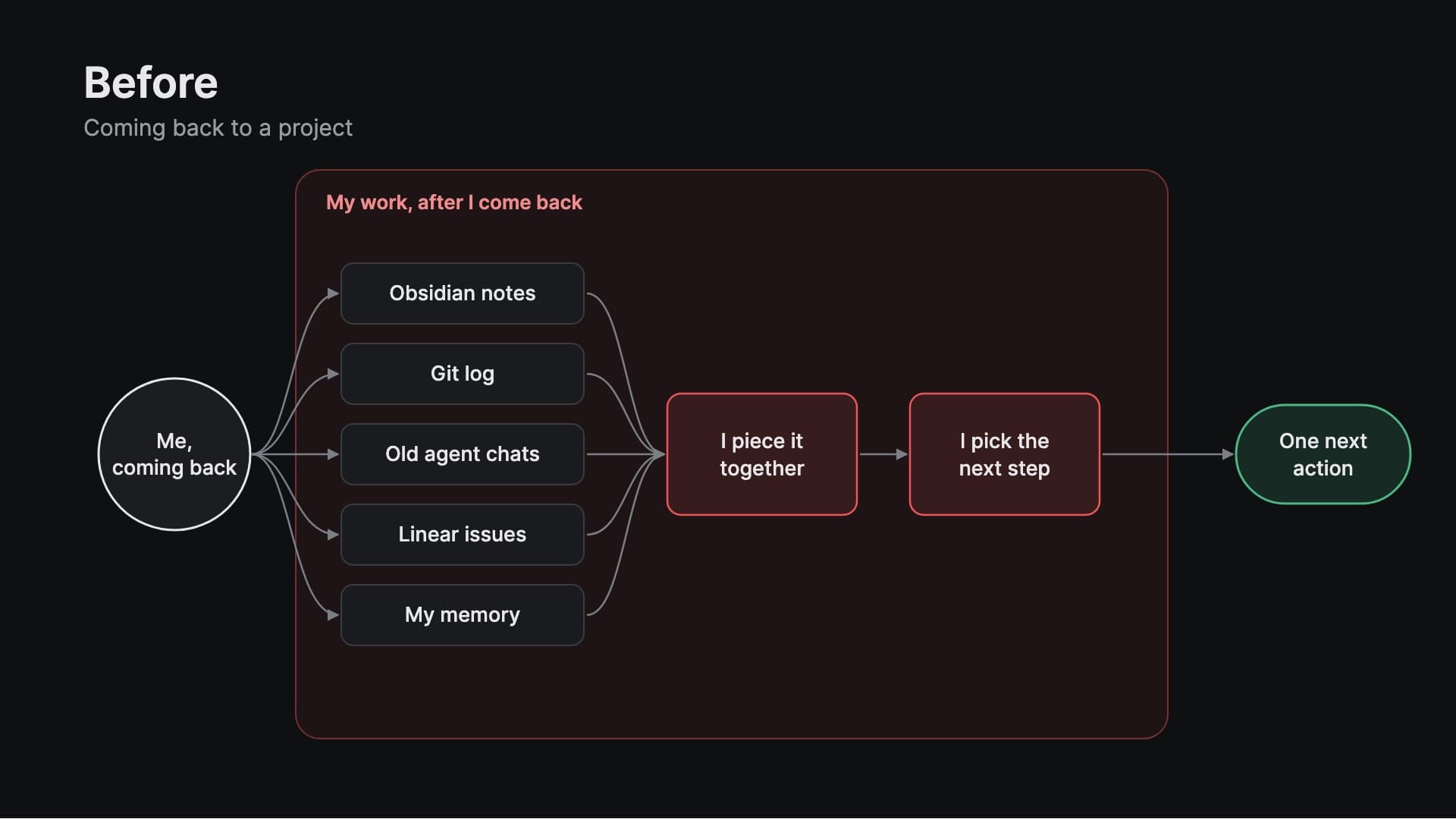
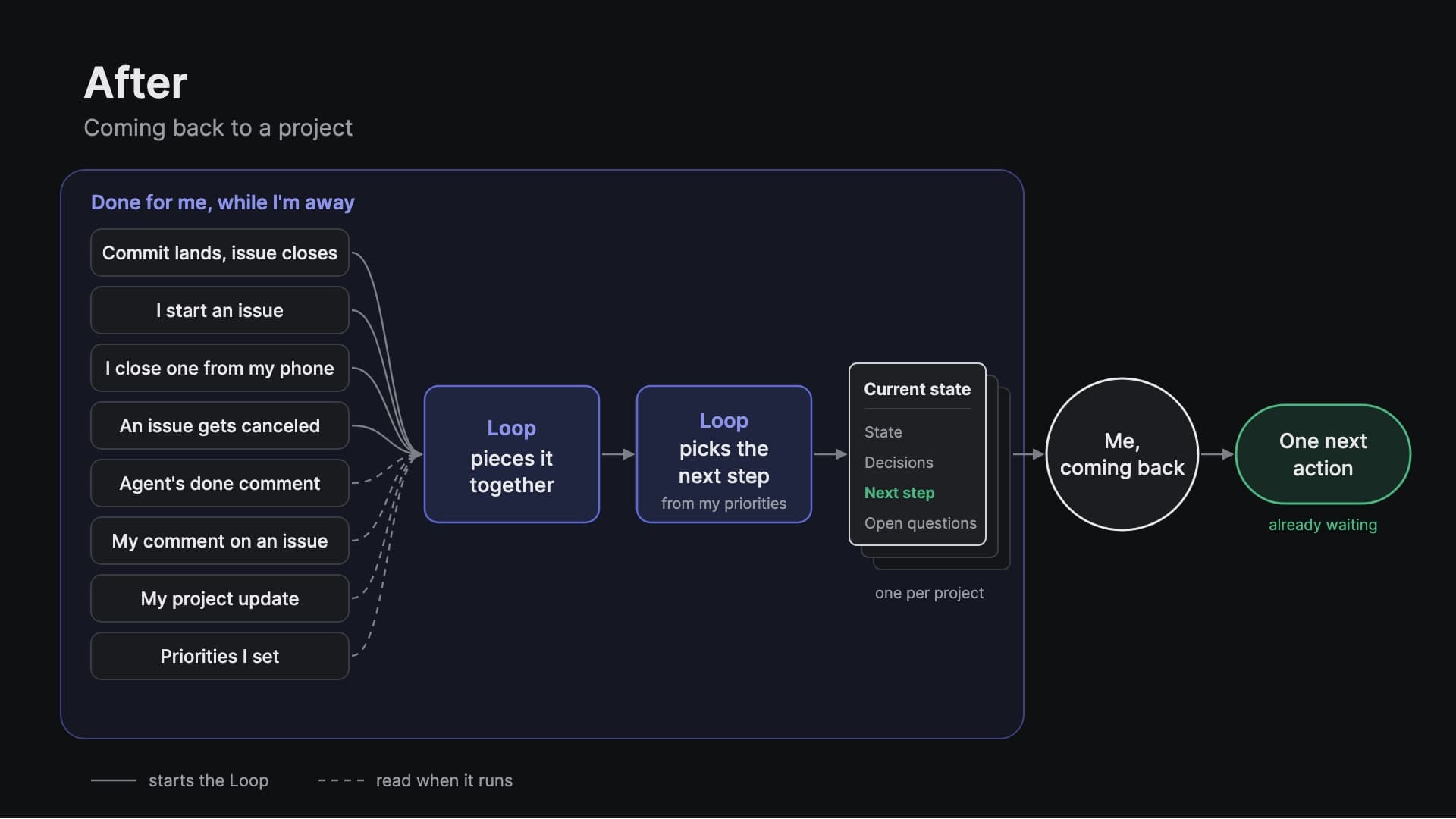
Now each project has one page in Linear that does that work before I arrive. It says what is happening, what was decided, and what to do next. A Loop rewrites it whenever an issue in the project changes status. When I come back, the next action is already waiting.
I recorded the whole thing on one real project, this website, on 2026-10-01: the setup from an empty page, a block of client work, and the return.
Everything you need to build it yourself is below: the page template, the three prompts, the Loop instructions, the rule for coding agents, and what it costs.
The system in three parts
- One page per project. It lives in the project description, because that is the first thing Linear shows when I open a project. It has five sections: State, Decisions, Next step, Open questions, Updated.
- One Loop per project. A Loop is Linear's automation that runs Linear Agent when something happens. Mine runs when an issue in the project changes status, and it rewrites the page from what is recorded in Linear.
- One habit. Close issues when the work is done: by hand, from the phone, or with
fixesand the issue ID in a commit. That status change is what keeps the page current.
I never edit the page after the first version. When I decide something outside Linear, on a call or in my head, I leave a one-line comment on the issue that starts with Decision:. The Loop picks it up on the next run.
What happened when I came back
In the morning I set up the page and the Loop, ran it once, and left the project alone for the rest of the day.
When I came back, the page said there were six open issues, none in progress, and the next step was the highest-priority issue in Todo: categories for articles. It linked straight to the issue. That was all I needed to start.
I moved the issue to In Progress by hand. The Loop ran on that status change too. Most of my issues never get a commit, so a click has to be enough.
Then I gave Codex one line: Work on Linear issue VS-192. Follow AGENTS.md. The rest of the instructions live in the repo (they are below). Codex built the category pages, posted one comment on the issue with its decision, and pushed a single commit with fixes VS-192.
I didn't touch Linear during that time. The push closed the issue, the issue's status changed, and the Loop ran. When I reloaded the project, the page had:
- State: five open issues, article categories done, with a pointer to the completion comment.
- Decisions: a new entry at the bottom, taken from Codex's comment, linked to that comment.
- Next step: make the footer shark fin fully visible across screen sizes. Rule 3, top of queue: it was now the only issue in Todo.
- Open questions: one article that didn't fit any category well, which Codex had flagged in its comment.
The run history on the Loop shows each rewrite: the manual run in the morning, the run when I moved the issue to In Progress, and the run when the commit closed it.
Why not Linear's own weekly summary, or project updates
The Loop mechanic is Linear's, and their Loops docs already have a close example: every Friday afternoon, review a project's recent updates and add a summary to its document. That one is for informing a team once a week.
Mine is for one person getting back into a project at any moment, so it differs in four ways:
- It runs on every status change in the project, not on a schedule.
- Decisions are append-only, one dated line each, with a link to where the decision was made.
- The Next step comes from a rule you can read, not from the model's judgment.
- It is the starting point for a coding agent, and the agent's done comment feeds the page back.
Project updates don't do this either. They are posts for other people, a timeline. When I come back, I want one page that is always current and keeps every decision.
Why not a state file in the repo
If you use coding agents, a STATE.md in the repo that the agent updates is the obvious alternative. It works, and in some ways it is better: it is free, it works offline, and it is versioned with the code.
But a file in the repo only changes when an agent session writes to it, and it only exists for projects that are code. Several of mine aren't. They have issues, todos and recurring tasks in Linear, and when one of those changes status, the project has moved forward without a push or a commit. I want the page to show that.
If you have one code project, one repo and one agent, use the file. If you juggle several projects and a lot of your work isn't code, a page in your tracker fits better.
Where things live: Obsidian and Linear
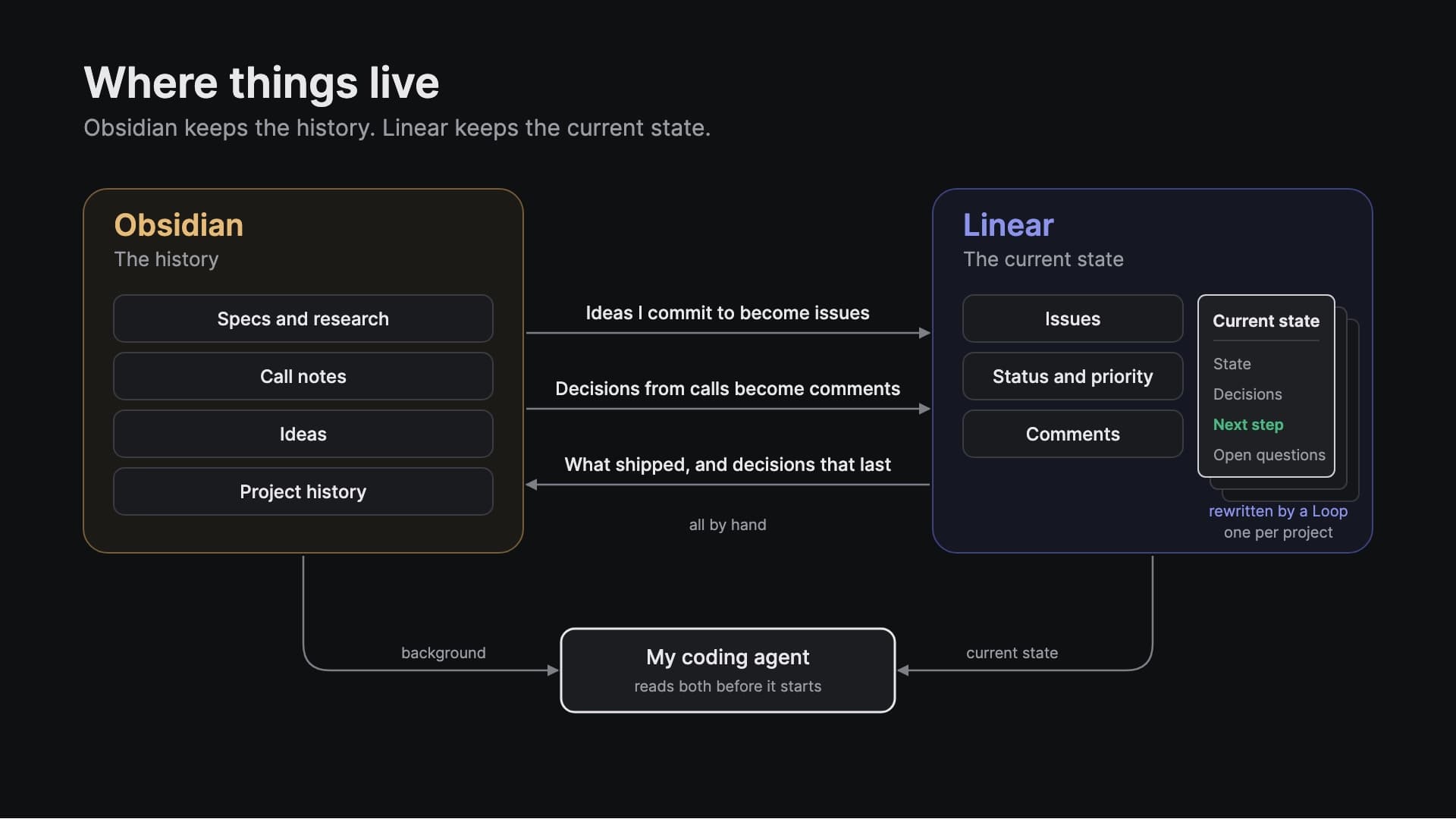
Obsidian keeps the history: specs, research, call notes, ideas, and what shipped when. Linear keeps the current state: issues, status, priority, comments, and the page. Three things move between them, all by hand. Ideas I commit to become issues. Decisions from calls become Decision: comments. What shipped, and decisions that will outlast the issue, go back to the project note in Obsidian.
My coding agent reads both before it starts: the project note for background, the Linear page for what is current. Where they disagree about current work, the Linear page wins.
What you need
- A Linear plan with Loops, and AI credits. Loop runs are paid from prepaid AI credits; they are not included in the plan. A run fails until credits are set up.
- A private team for sensitive projects. The Loop below is scoped to one project, but keep client work in a team the Loop can't read.
- For the coding-agent part: the GitHub integration with "Link commits to issues" on. On a personal GitHub account I had to add a webhook per repo. In the team's settings, set the commit automations: "On PR or commit open" moves an issue to In Progress, "On PR or commit merge" moves it to Done. Without those, commits don't change status and the Loop never hears about them.
You don't need code at all for the basic version. Changing an issue's status by hand runs the Loop the same way.
The page template
The two lines at the top are permanent; the Loop never touches anything above the Current state heading.
The setup, step by step
The whole setup happens in Linear Agent chat (⌘J in Linear). Linear's own advice for Loops is to get the result you want once in a chat, check it, and only then turn it into a Loop. That is what the three prompts do. Replace the parts in angle brackets with your own.
Step 1: seed the page from your notes
Linear can see the project's issues but not the decisions behind them. Those were in my Obsidian note, which Linear can't read. So the first prompt writes the page once, with the decisions that matter for current work. On my project the agent took seven seconds.
Pick decisions that constrain future work. One of mine: old /articles/<slug> URLs redirect permanently to /<slug>, so nothing new can live at /articles/<one segment>. When I first wrote the categories issue, I had put the category pages exactly there. A redirect from 2023 would have broken every one of them. That is the kind of decision I forget, so it is on the page.
Step 2: do the job once, in the chat
This is the job I want automated, run once by hand so I can check the result. It took two minutes, and the agent highlighted what it changed.
Check the page before going on. On mine, the Next step was the only High-priority issue in Todo, labeled "top of queue", which is what rule 3 says.
Step 3: make it a Loop
Same chat. The agent took 20 seconds and saved the Loop disabled, as asked.
Why a team-owned Loop with a project condition: project-owned Loops weren't enabled in my workspace. I tested the team version on a throwaway project first. It ran on every status change in that project, including a second change on the same issue and changes made by commits, and never on an issue outside it.
Step 4: check one setting, then turn it on
Open the Loop and check each field against the prompt. The one that matters is Allow changes outside triggering issue. The Loop runs on an issue, but it writes to the project description, which is outside that issue. With this setting off, it can't write the page at all.
Team access limits what it can see. Web search off means nothing leaves Linear. The first line of the instructions is a scope check: if the issue isn't in the project, it stops.
Step 5: run it once by hand
Use Run now on the Loop and pick an issue in the project. It runs as if that issue had triggered it, without changing the issue. Mine took 49 seconds and kept every existing decision.
Project descriptions have no version history in Linear. The Loop's run history is the record of every rewrite: when, what triggered it, and what it did.
The next-step rule
The Next step is the part I read first, so it can't be a guess. In plain words:
- If I wrote a next step down, it uses mine.
- Otherwise, the highest-priority issue I'm working on.
- Otherwise, the highest-priority issue I've committed to (Todo).
- Otherwise, the top of the backlog, labeled as a suggestion.
- With nothing open, it says so and names the decision that blocks a next step. It never invents a task.
Status and priority are the only two fields I keep current, and the Loop never changes either one.
The rule for coding agents
This goes in the repo's AGENTS.md (or CLAUDE.md), so no one has to remember it:
The last line is there because of a dry run. Codex couldn't post its comment (the Linear tool needed approval) and committed anyway, so the decision never reached the page. I connected Linear in Codex, pre-approved its comment tool in Codex's config, and added the stop.
The commit habit is two words: refs VS-192 while working, fixes VS-192 on the commit that finishes it. No pull request in my case, because I'm one person pushing to main.
Optional: workspace guidance
I didn't use this for the video, but if Linear Agent's summaries drift, Linear lets you add workspace guidance for it (Settings, AI). This is the text I'd start with:
What it costs
On recording day the Loop ran three times and cost $0.43, about 15 cents per run. In the dry run on a throwaway project, six successful runs cost $0.92. Linear Agent chats didn't appear in the usage history.
Every status change is one run. An issue that goes to In Progress and then to Done costs about 30 cents to track. Working alone, that doesn't add up to much.
If you have many projects, or a team moving issues all day, a run on every status change adds up. Then I'd put the Loop on a schedule instead: once a day, at the start or end of the day, reading what changed since the day before. You pay for one run a day. The catch is that the page lags behind during the day, and the Loop also runs on days when nothing happened.
Limits, and what went wrong
The main limit: the Loop can't record a decision nobody wrote down, and the page is only as current as the last status change. If I finish something and never close the issue or leave a comment, the Loop never runs and the page goes stale.
When the page is wrong, it is for one of four reasons. These are the ones I hit, in the dry run and on the real project:
- The run didn't happen. The very first dry-run run failed with "Your workspace's AI credits aren't set up yet". Every run after adding credits worked.
- Missing input. Codex couldn't post its done comment and committed anyway, so its decision never reached the page. Fixed with the stop rule above.
- Wrong interpretation. On the real run, Codex's
Decision:line read more like a changelog ("Implemented the six fixed categories with one frontmatter slug per article, shared category navigation...") than a decision. The Loop copied it faithfully. If you want shorter decisions, tighten the wording of the rule. Separately, Linear Agent told me in chat that the Loop wouldn't rerun on a second status change of the same issue. Testing showed it does. - Overtaken by later work. A new issue only shows up on the page at the next status change, because a Loop has one trigger and mine is status changes. Linear Agent chat reads live data, so asking it "what do I need to remember?" covers the gap.
Two product notes: project descriptions have no version history, so the run history is your audit trail, and a Loop has exactly one trigger.
The recipe
- One page per project, in the project description.
- One Loop that rewrites the page when an issue in the project changes status.
- One habit: close issues when the work is done.
Copy the prompts above and swap in your project and your decisions.
PS. Linear isn't sponsoring this. I pay for the plan and the AI credits myself.
If you like what you see, you'll find more stuff like this on my Twitter.
