Compound Engineering: the AI coding workflow that actually learns
AI and agents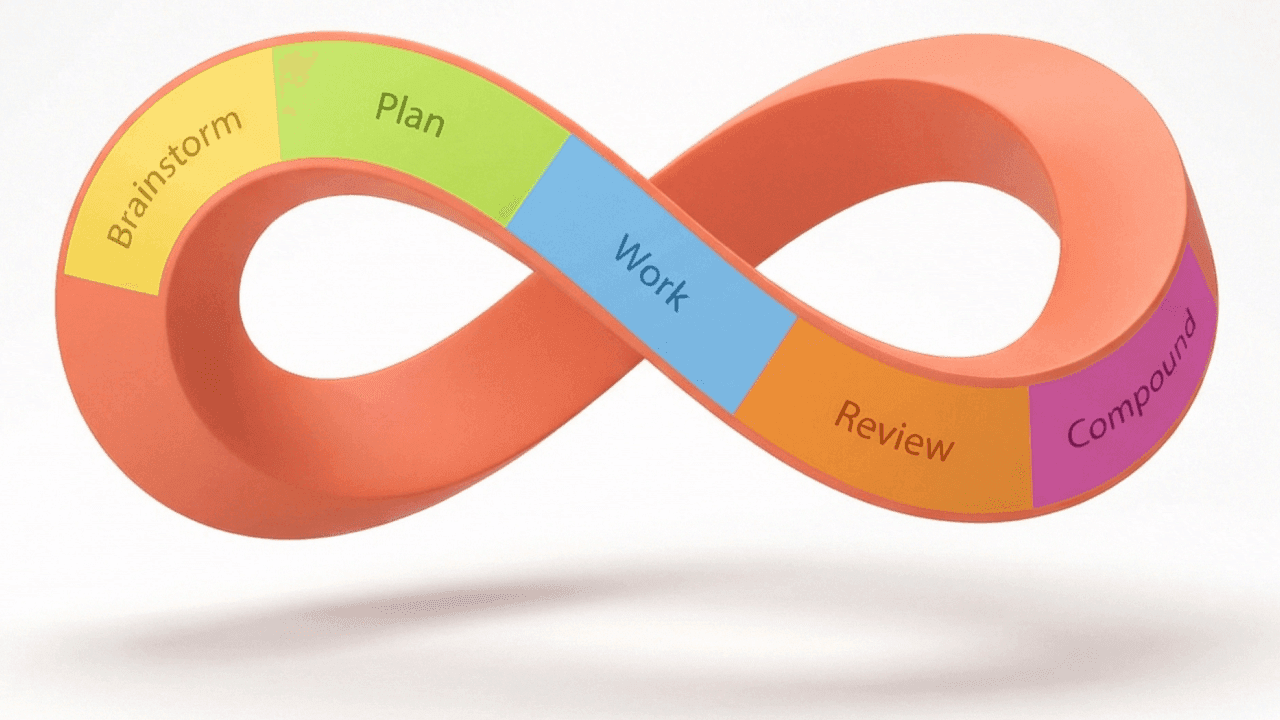
Most developers use AI to code faster today. But they're missing the bigger opportunity - building a system that makes them faster tomorrow, and every day after.
There's a workflow called Compound Engineering where every piece of work is an investment. Every code review teaches the system something new. Every bug fix becomes a rule it won't break again. And unlike a regular AI session where you lose everything when you hit the context limit, this knowledge persists. And more importantly, it compounds.
What is Compound Engineering?
Here's how most people use AI coding tools: you prompt, it writes code, you ship, then you start over. Blank slate, from scratch.
Compound Engineering flips this process: each task makes the next one easier. But this isn't just "the AI remembers things." This is a process where your feedback becomes defaults - written down in config files and applied automatically to every future task.
The workflow has five steps:
-
Brainstorm - explore requirements and approaches before committing to a direction. Instead of crafting the perfect prompt, you run
/workflows:brainstormand describe what you want. Claude asks the non-obvious questions, surfaces edge cases, and writes the spec for you. -
Plan - agents research your codebase and the web to create detailed specs rooted in your own code.
-
Work - agents execute the plan. If the first two steps were done properly, this is the easy part.
-
Review - a pack of specialized agents reviews the code in parallel and gives you the results.
-
Compound - you capture what you learned in this session and feed it back into the system.
Here's the counterintuitive part: spend 80% of your time on planning and review, only 20% on coding. If your plan is good, the coding is almost automatic.
Installing the plugin
Installation is two commands for Claude Code:
With this one plugin, you get 27 different agents, 20 commands, 14 different skills, and one MCP server. The agents break down like this:
- 14 review agents that analyze your codebase from different perspectives
- 4 research agents
- 3 design agents
- 5 workflow agents
- 1 docs agent
On top of that, with the Context7 MCP server, you can access docs for over 100 libraries that are always up to date, so you don't work with outdated library info.
Step 1: The brainstorm phase
This step is optional, but in my opinion crucial. It's where AI interviews you and asks all those helpful questions. You can skip it and go straight to planning if you have a very narrowly defined feature with clear constraints. But when it requires thinking about how things fit together, brainstorming is where you start.
Describe what you want. Messy, like a brain dump. For my example, I wanted to add AI-generated header images to my Next.js blog. Claude immediately figured out my setup, recognized the patterns, understood what goes where, and how images are included in articles.
Then it started interviewing me:
- How and where to put the generated images
- Should it be a CLI tool, a pre-commit hook, or something else
- Do I want a consistent branded style for all articles or per-article depending on content
- Should it generate the image based on article content (I said yes, with an option to add my own prompt)
- What visual style I want for the overarching brand
After the brainstorm, it generated a new docs/brainstorms/ folder with a full summary: what we're building, how it'll be used, what the script will do, why we decided on this approach, what key decisions were made and why, and what open questions remain.
Already the system learns and remembers what decisions were made and why.
Step 2: The plan phase
With a brainstorm doc in place, planning becomes easy. If you haven't done a brainstorm, planning would be similar: you describe your feature briefly and if needed, it asks questions before proceeding.
A lot happens during this stage. For my image generator, it:
- Took the brainstorm file immediately
- Launched two agents in parallel - one to research the repo, another learnings researcher to learn from the brainstorm document
- Figured out the patterns of the codebase and where everything goes
- Realized the task involves an external API (Nano Banana Pro) and fetched the most up-to-date docs
- Made suggestions and identified key gaps
- Consolidated everything into a comprehensive plan
The result is a docs/plans/ folder with the full implementation plan: what we're building, proposed solution, the flow, technical considerations, and acceptance criteria.
Optional: plan review
Before moving to work, you can run more agents to review the plan:
The plan review process launched three agents in parallel:
- DHH reviewer - reviewing from a Rails/simplicity perspective
- Kieran reviewer - one of the creators of the workflow
- Code simplicity reviewer - focused on keeping things minimal
All three had something to say. They pointed out positives, issues, and blocking concerns. The simplicity agent recommended generating only one image instead of two, which made total sense. After reviewing the suggestions, I applied the fixes and the plan was updated before moving to work.
Step 3: The work phase
With all the planning done, this part is almost automatic.
The system:
- Switched to a new branch
- Created tasks to complete
- Went through doing all the work
- Hit some errors and fixed them
- Updated the implementation plan with what was done
- Created the commit
- Gave a summary
The output: a new script I can call with CLI, modified dependencies, and documentation on how to run it (default based on article content, or with a custom prompt).
When it missed something, like assuming .env.local instead of my .env file (which is in .gitignore so Claude couldn't see it), I just told it, and it updated the script.
It generated a test image, reviewed if it fit the style I wanted, noticed it was too large (1.7MB), addressed that, and tested again with a much smaller result. Everything was already in place: the content of the article updated, the image in the right folder.
Step 4: The review phase
Now the interesting part. Time to unleash a bunch of agents into the code.
Because I was on the feature branch with one PR, it automatically picked up what we were working on and launched six agents:
- Security sentinel - security perspective
- Performance oracle - performance perspective
- Architecture strategist - architectural concerns
- Code simplicity - complexity review
- Pattern recognition - detecting patterns and anti-patterns
- Agent native - ensuring agent compatibility
All of them look at the same piece of code from different perspectives.
For my image generator, there were no P1 critical findings (nothing blocking). There were a couple P2 important ones (no API timeout, no structured output) and four P3 nice-to-haves.
The review gives details for every finding: file location, what the issue is, what's recommended.
It also says what's working well, which agents were used, and the verdict: safe to merge, but consider fixing P2 findings.
These aren't generic "looks good" reviews. Each agent is specialized. Standard AI reviews are polite - they want to please you. These agents are built to protect you, not to be nice to you. They find real issues if the issues are there.
Step 5: The compound phase
This is where the magic happens.
This step looks at all the review comments - from agents and from you - then extracts patterns, and updates your configuration automatically.
Four agents start working in parallel:
- Analyzing docs
- Extracting patterns
- Classifying findings
- Prevention strategist - what have we learned and how can we prevent similar issues in the future
It created several files:
- A specific solution summary with what was done
- A code review checklist
- Codebase analysis
- Prevention strategies
- Testing patterns and examples
- Quick reference for code reviewers, writing new scripts, and retrofitting existing code
This is why it's called Compound Engineering. Every review you give makes the next review better. You're teaching the system so it can build together with you.
How many times have you given the same feedback? "Don't call slow APIs in the request." "Don't log secrets." "Keep the state simple."
With compounding, you give that feedback once. The system learns. You never say it again.
Why this matters
The team at Every (who built this plugin) reports that this workflow lets them ship much faster and deliver much higher-quality code. Features that took a week now ship in one to three days.
The plugin has over 6,000 stars on GitHub and is actively developed by both the team at Every and contributors. It's a real workflow in production.
I can't promise you'll see the same results. But if you follow these steps and put in the time during brainstorming, planning, and review, then every piece of work makes the next one easier. The gains compound over time.
It's a mindset shift. You stop asking "how do I code this?" and start asking "what should the system learn from this?"
One note on cost: spinning up a dozen agents does use more tokens than a single prompt. But you trade tokens for fewer human hours, fewer production incidents, fewer frustrations during review, and faster shipping.
Getting started
If you want to try this:
-
Install the plugin and run
/workflows:brainstormon your next feature. See how parallel research changes your planning. -
Start small with compounding. Maybe create one custom agent that captures your review style - e.g., just your top five annoyances. Let it grow from there.
-
Use
/workflows:compoundafter your first code review. Watch your feedback turn into permanent rules. That's when it clicks.
Resources
AI coding tools make you faster today. Compound Engineering makes you faster tomorrow, and every day after that.
The plugin is free. Your AI is waiting to learn from you.
Now go teach your AI something, for a change.
If you like what you see, you'll find more stuff like this on my Twitter.
