ClawdBot: The self-hosted AI that Siri should have been
AI and agents
Remember when Siri came out? We all thought "This is it! An AI that understands you, remembers your preferences, actually helps".
Yeah, that didn't happen.
Siri still can't remember what I told it yesterday. Google Assistant suggests restaurants I've never asked for. But that future we were promised? It exists now. It's just not coming from Apple or Google.
What is ClawdBot?
ClawdBot is a self-hosted AI assistant created by Peter Steinberger. Unlike ChatGPT or Claude where you go to a website and type, ClawdBot lives inside the messaging apps you already use - Telegram, WhatsApp, Discord, Slack, Signal, even iMessage if you have a Mac running somewhere.
Four things make this different from anything else:
-
Always available - on your phone, at your computer, wherever you are. Same assistant, same conversation, everywhere.
-
Persistent memory - it doesn't forget what you told it yesterday. If you mentioned you have a meeting on Friday, it remembers. No more starting from scratch.
-
Proactive - it can reach out to YOU. Morning briefings. Reminders. Alerts when something you care about happens. Most chatbots wait for you to type. This one reaches out.
-
Full computer access - anything you can do on your computer, it can do too. Browse the web. Fill out forms. Research topics. It browses, fills forms, researches - while you do something else.
Why you need a VPS
For ClawdBot to message you proactively and always be available, it needs to run 24/7. Running it on your laptop means every time you close the lid, your assistant goes to sleep.
The solution is a VPS - a virtual private server. Hetzner has servers for about $5/month. That's less than a coffee.
Cost breakdown:
- VPS: ~$5/month for the basic tier
- Claude: Pro is $20/month, Max is $100-200, or API keys with usage-based pricing
Quick tip: the cheapest tier (~2GB RAM) is fine for chat. If you want browser automation skills (where ClawdBot controls a headless Chrome), you'll want at least 4GB RAM.
How it works
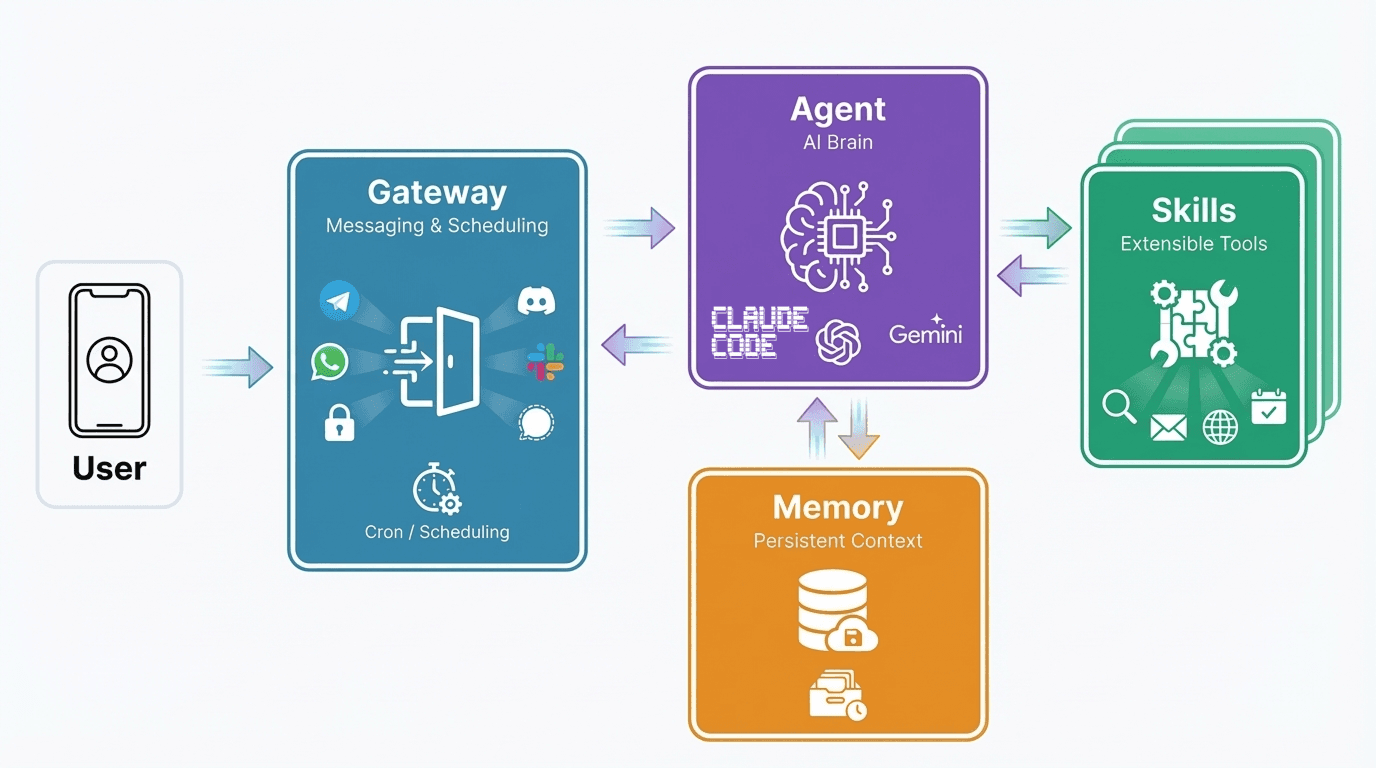
ClawdBot Architecture
ClawdBot has four main pieces:
- Gateway - your front door. Connects to messaging platforms and handles scheduling (cron jobs for proactive briefings)
- Agent - the brain. This is where your AI model lives (Claude, GPT, or local models)
- Skills - extensions that let your agent search the web, check email, control a browser, and more
- Memory - persistent context that remembers your conversations and preferences
Quick setup
Here's the essential setup flow. I'm using Hetzner and Telegram, but you can adapt this to other providers.
1. Set up your server
After creating a Hetzner VPS with Ubuntu, SSH in and create a dedicated user:
2. Install dependencies
3. Install ClawdBot
4. Run the setup wizard
The wizard walks you through:
- Gateway: select "local"
- Runtime: pick "Node" (required for WhatsApp)
- Authentication: OAuth if you have Claude Pro (uses your existing subscription, no extra API charges), or API key
- Providers: I recommend Telegram - it uses official bot APIs
For Telegram, you'll need to create a bot via @BotFather - just message /newbot and follow the prompts to get your token.
5. Verify it's running
6. Approve yourself
By default, ClawdBot won't respond to unknown senders. Message your bot on Telegram, then approve the pairing:
Done. You have a working AI assistant on a $5 server.
The killer feature: proactive briefings
This is what made me fall in love with ClawdBot. It can message YOU first.
You could set up stock alerts, weather warnings, news monitoring, regular research, important emails to take a look at, calendar prep - anything you can describe in a prompt.
Skills and what people are building
ClawdHub is the skills marketplace. Popular ones include:
- Web research - summarize articles, research topics, pull data from websites
- Browser automation - control a headless Chrome, fill out forms, use your logged-in sessions
- Email and calendar - check your schedule, draft emails, flag important messages
- Developer tools - run commands, check logs, help with code
Some impressive real-world projects from the community:
- WhatsApp Memory Vault - someone connected their startup's entire WhatsApp history (1000+ voice messages), had ClawdBot transcribe them, cross-reference with Git commits, and generate a searchable knowledge base
- Grocery Autopilot - photo of recipe → extract ingredients → map to grocery store → add to online cart. Idea to shopping cart in under 5 minutes
Security considerations
This is a real agent with real powers. Be thoughtful:
- Pairing is your first defense - only approve your own accounts
- Be careful with skills - browser automation with your cookies is powerful but think about what that means
- Keep the Gateway on localhost - use SSH tunneling for remote access:
Then open http://127.0.0.1:18789/ locally.
- WhatsApp warning - use a dedicated phone number. WhatsApp doesn't have a "bot" concept like Telegram. If you link your personal WhatsApp, every inbound message becomes agent input.
The honest take
ClawdBot is early stage. The maintainer himself admits "onboarding is still rough". You might hit weird errors. Some skills work better than others.
But the Discord community is incredibly active. There are literally two ClawdBot instances in there answering questions. Bugs get fixed fast - sometimes while you're still in the chat reporting them.
For the developers: the bot's personality lives in a SOUL.md file you can edit. And the agent workspace can be a Git repository - if your bot "learns" something wrong, just git revert.
Don't expect polished enterprise software. But the innovation and community make up for the rough edges.
Resources
We've been going to websites to talk to AI. That's backwards. The assistant should come to you.
Now go get yourself an assistant.
If you like what you see, you'll find more stuff like this on my Twitter.
